

It's not just darts. A face-to-face challenge.
Fliq is afront-facing camera designed for the Scolia Home 2 system(and most upgraded Scolia Home systems). It lets you see both your opponent and yourself during the match.
With ultra-low latency streaming, Fliq brings the competition right into your room. Together with Scolia’s board cameras, Fliq delivers a playing experience unlike anything you’ve had on your Scolia before.

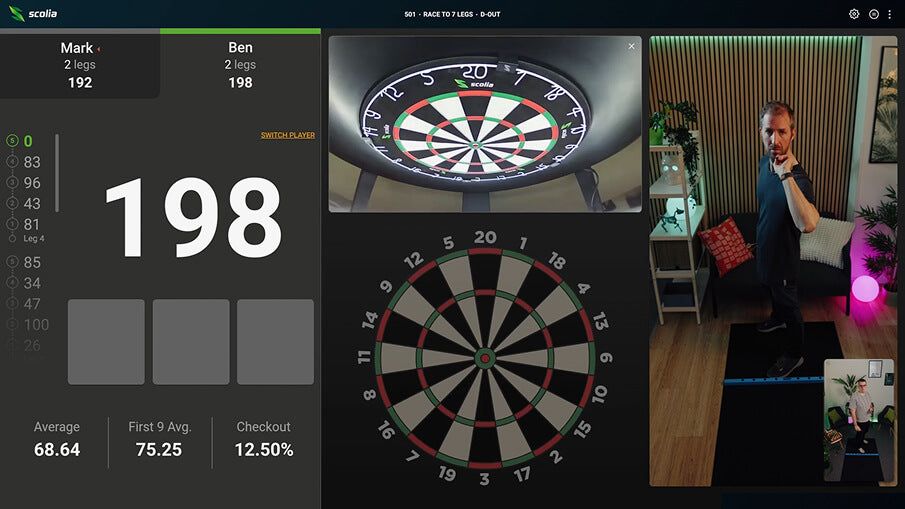
Fliq adds a new layer of trust and transparency to gameplay. It helps ensure that every match reflects genuine skill and engagement, creating a more authentic experience for all players. This upgrade strengthens the integrity of the competition while keeping the fun and energy of the game front and center.

Set up the Fliq in seconds — it’s designed to fit perfectly onto the Home 2’s top camera leg.Simply align the Fliq below the top leg, click the rear hook into place, and plug the Fliq’s cable into the processing unit’s fourth USB port.Fliq only activates automatically when you start an online game, and stops streaming at the end of the game — ensuring your privacy at all times.
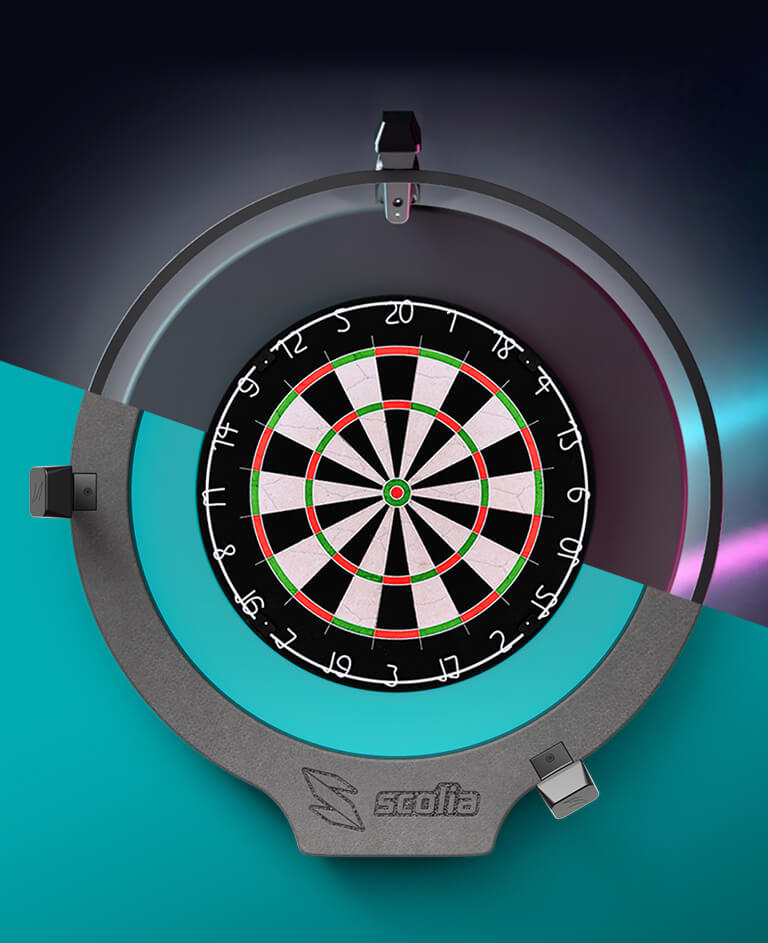
The Fliq camera is designed to attach to the top leg of the Scolia Home 2 system. This also makes it compatible with older Scolia Home systems that are using the legs from the Upgrade Kit. However, some of the earliest versions of the processing unit lack the necessary USB ports.
To check if the Fliq is compatible with your system, look for the sticker with the serial number on your Scolia Home packaging. Below the serial number, you’ll find your hardware version number.
- If it’s 2.2.0, 2.2.1, 2.3.0 or 2.3.1, your unit is compatible with the Fliq camera.
Frequently Asked Questions
What are the requirements of setting up Scolia Home 2?
- Apart from a standard steel-tip dartboard, you will need a 75 by 85 cm flat surface around your dartboard on a solid wall (preferably brick or concrete).
- If you purchase the Scolia Home 2 system without a light ring, you will also need a Winmau Plasma light surround to mount the complete system.
- While wired Internet access is not necessary, it is highly recommended for best performance.
- For detailed instructions, read our step-by-step installation guide or watch our assembly video.
Which light surrounds are compatible with Scolia Home 2?
- You can purchase Scolia Home 2 with or without a light surround. Apart from the Scolia light ring, Scolia Home 2 is compatible with the Winmau Plasma light surround. We recommend buying the Scolia Home 2 system without a light surround if you already have a Plasma light. We cannot provide performance guarantees for installations that use different light surrounds.
Can I use Scolia Home 2 in a non-residential environment?
- Yes, Scolia Home 2 is designed to satisfy the demands of various environments, such as offices, darts clubs and darts bars. The robust yet elegant design ensures reliable performance and durability in all circumstances. Once the system is installed, there is no need for any manual adjustment or calibration during everyday use.
Is wired Internet connection necessary?
- For best performance, we highly recommend using a LAN cable to connect your Scolia unit directly to your router, as it offers the best and most stable connection. Scolia Home 2 supports native WiFi connection, but bear in mind that the performance of the system is heavily affected by the quality of your WiFi network.
- You can use wireless internet connection for your client device. However, depending on the quality of your wireless access network, you can experience large variance in response times. Therefore, if latency is crucial for you, we recommend using wired connection for the client device for the best user experience. For instance, you can open the Scolia web application on your PC and redirect its screen to a monitor/TV near the dartboard. If you want to mirror the user interface of your tablet/smartphone to a TV, you have many options to do so: depending on your platform, you can check your options for Android and iOS.
Is Scolia Home 2 compatible with Winmau Blade 6 Triple Core?
- Yes, Winmau Blade 6 Triple Core dartboards are fully supported by Scolia Home 2.
Do Scolia Home 2 owners access the same software functionalities as Scolia Pro owners?
- Yes, the full functionality of the Scolia web application is available free of charge not only for Scolia Pro and Home owners, but for anyone who registers at game.scoliadarts.com.